01Where it goes
Anything that passes through is remembered.
On an audio track, a bus or a return in your DAW: drums, a loop, a vocal, a whole group. The LENS RESOLANA app takes your audio interface's input, so you can also run a synth or guitar straight through it. The IN and OUT meters in the top bar show what arrives and what leaves.
Safe to pushEvery factory preset is tested to stay under −1 dBFS, and feedback past 100 % builds into saturation rather than exploding.
02First capture
The moment you liked is still there.
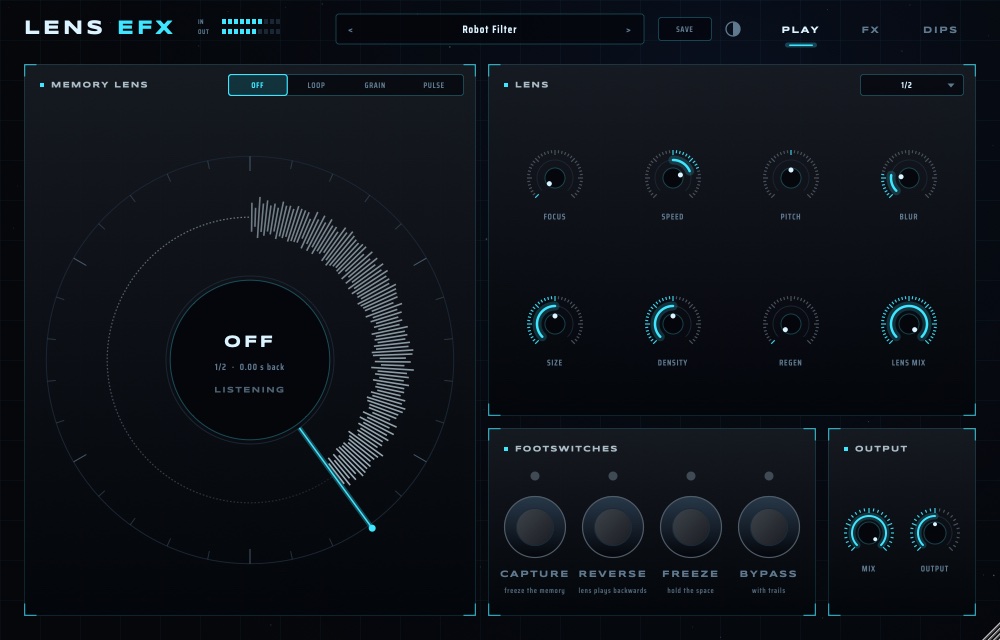
- Play a drum loop through LENS RESOLANA. The ring on the PLAY page fills: that is the memory, always recording the last 30 seconds.
- Set MEMORY LENS to LOOP. Pick a LENGTH in the menu at the top right of LENS (try 1/2).
- Stomp CAPTURE: the memory freezes and the slice loops, in time.
- Turn SPEED to −1 for backwards, 0.5 for half speed. Turn FOCUS to reach further back into the memory.
- CAPTURE again to let go and hear the input.
03The Memory Lens
Reach back. Hold it. Bend it.
| Mode | What it does |
|---|---|
| OFF | Still listening, nothing played back. |
| LOOP | Plays a slice of the memory on repeat: speed, direction and pitch are yours. |
| GRAIN | Scatters the slice into overlapping grains: clouds, shimmer, frozen moments. |
| PULSE | Chops the slice into rhythmic shards on the beat: stutters, glitches, triplet rain. |
| Knob | Does |
|---|---|
| FOCUS | How far back the slice starts (0–8 s ago). |
| SPEED | −2× to +2×; below 0 plays backwards. |
| PITCH | ±24 semitones. |
| BLUR | Smears the edges and timing. |
| SIZE / DENSITY | Grain length and how many (GRAIN, PULSE). |
| REGEN | Feeds the result back into the memory. Past 100 % it builds. |
| LENS MIX | How much of the lens you hear against the input. |
04Footswitches
Your foot decides when.
| Switch | Does |
|---|---|
| CAPTURE | Freezes the memory so the lens keeps playing the same moment. |
| REVERSE | The lens plays backwards. |
| FREEZE | Holds the SPACE tail forever; play over it. |
| BYPASS | Clean signal, while echoes and reverb ring out naturally. |
All four are plug-in parameters: map them to a MIDI controller or a foot controller in your DAW.
05The FX page
Wear, colour, distance.
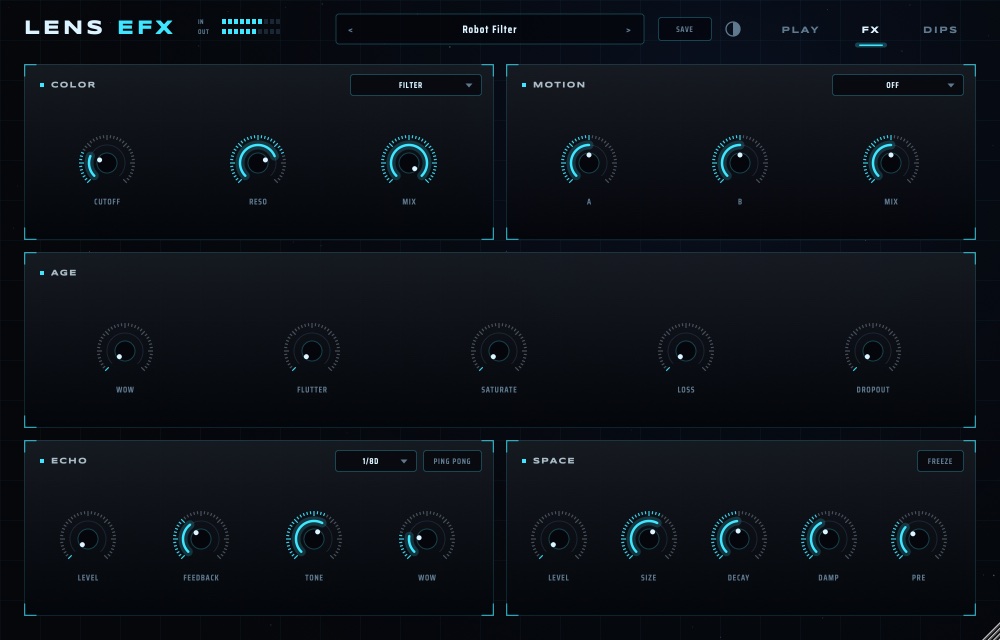
- COLOR and MOTION: two slots, each holding any LENS effect: DRIVE, FOLD, LOFI, CHORUS, PHASER, FLANGER, RING, STUTTER, RESONATOR, TAPE STOP, FREQ SHIFT, ECHO, SPACE, FILTER or DJ FILTER. The two knobs are named after what they move (CUTOFF and RESO for a filter, FREQ for a ring) plus MIX.
- AGE: WOW and FLUTTER (pitch wobble), SATURATE, LOSS (dull, worn highs) and DROPOUT (tape gaps).
- ECHO: synced time, PING PONG, FEEDBACK up to 125 %, TONE and WOW.
- SPACE: SIZE, DECAY, DAMP, PRE-delay and FREEZE.
06DIPs: make it move
Sixteen switches. Let it move by itself.
The DIP bank is 16 switches, each wired to one control. Flip a switch and that control starts moving, driven by RAMP or STEPS.
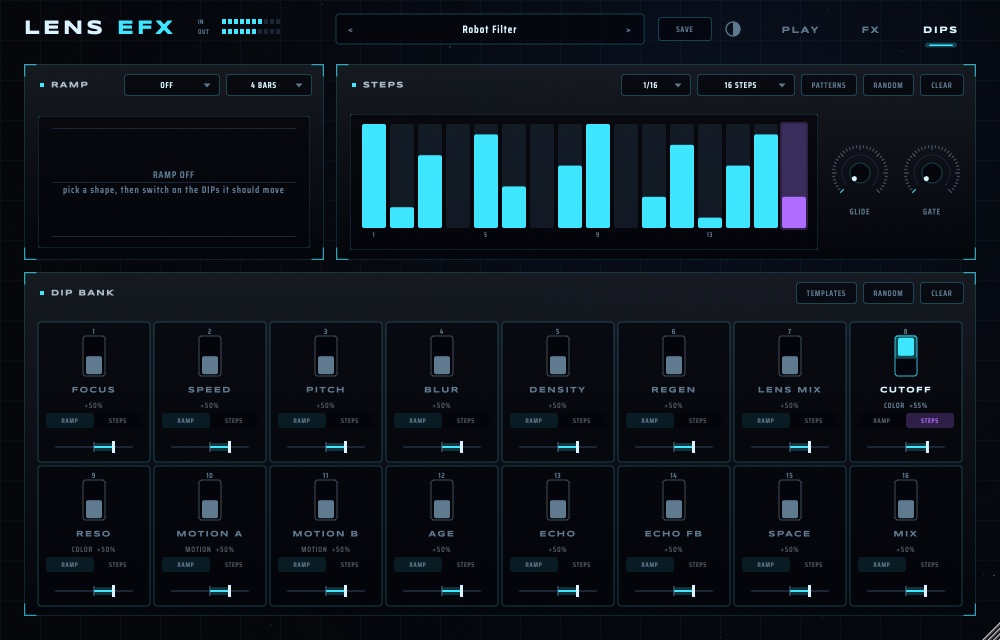
- On the FX page, put a FILTER in COLOR.
- On DIPS, flip DIP 8 (CUTOFF). Under it choose STEPS; the slider sets how far it moves.
- Draw bars in STEPS, or press PATTERNS or RANDOM. Pick the rate (1/16) and the number of steps (up to 64). GLIDE smooths between steps; GATE shortens them.
- For a build-up, choose a RAMP shape (RISE) and length (4 BARS) and switch the DIPs it should move to RAMP.
- TEMPLATES sets the whole bank for a job (ROBOT FILTER, AURORA GATE …) and switches on the effects it needs. CLEAR starts over.
07Performing
Let the echo finish the sentence.
- The PERFORMANCE presets are ramped build-ups and drops: start one on the bar before a change.
- Throw the echo: raise ECHO FEEDBACK past 100 % for a beat, then pull it back.
- End of a section: CAPTURE, set SPEED to 0.5, then BYPASS on the downbeat. The trails carry you into the next part.